
Lifeline Application Status 2026: How to Check
Applying for affordable phone or internet service can provide meaningful relief when monthly household expenses are difficult to manage. However, after submitting a Lifeline application, many consumers are unsure how to confirm their status, resolve verification problems, or contact the appropriate support department.
The federal Lifeline program helps eligible Americans reduce qualifying communication bills.
You will remain on the site.
While the application process is generally straightforward, missing documents, identity verification issues, or enrollment delays can prevent applicants from receiving their benefits as expected.
Fortunately, official resources are available to help. Whether your application is pending, additional records are requested, or your phone service has not been activated, this guide explains how to track your request and find the right assistance in 2026.
How to check your Lifeline application status online
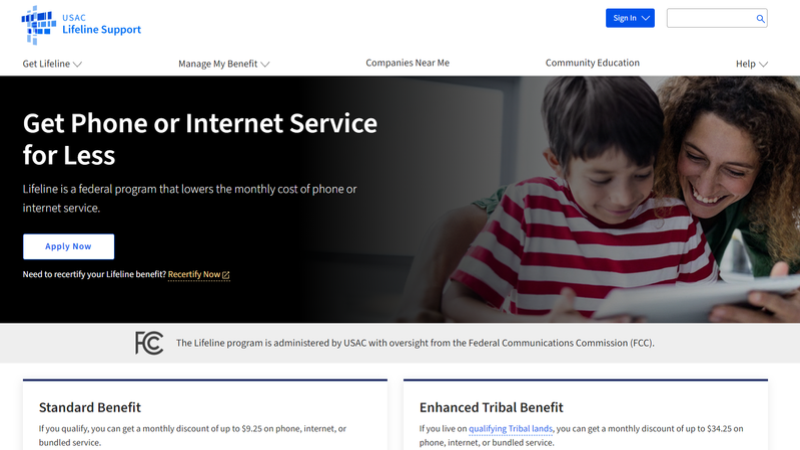
The Lifeline program is administered by the Universal Service Administrative Company (USAC) under the oversight of the Federal Communications Commission (FCC). In most states, applicants use the National Verifier to determine whether they qualify for the monthly communication discount.
After submitting an online application, consumers can return to their National Verifier account to review available application information and any additional verification requirements. USAC may also provide notifications by email or other authorized communication methods.
However, approval for Lifeline eligibility is different from activation with a telecommunications company. If your eligibility has been confirmed but your phone or internet service is not working, the participating provider is generally responsible for resolving enrollment and activation issues.
OFFICIAL LIFELINE SUPPORT
Need Help With Your Application?
The Lifeline Support Center can assist with application status, missing documents, eligibility verification and recertification questions.
1-800-234-9473
Available daily, 9 a.m. to 9 p.m. Eastern Time
What different Lifeline application results mean
Application results can vary depending on whether eligibility has been verified and whether additional documentation is necessary. Understanding these differences helps consumers identify the next appropriate action.
Common situations include:
- Application under review: Your submitted information or supporting documents are being evaluated. Follow the instructions in your account or official notification.
- Additional documents required: The verification system could not confirm certain information automatically. You may need to provide proof of income, identity or government assistance participation.
- Eligibility confirmed: Your qualification has been established. You can proceed with selecting a participating phone or internet company and completing enrollment.
- Eligibility not confirmed: Your information did not establish qualification under the applicable rules. Review the reason provided and follow official instructions for corrections or additional documentation.
- Service activation pending: Your Lifeline eligibility may be approved while the telecommunications company is still processing enrollment or activation.
Importantly, these descriptions are general guidance rather than a live status check. Your actual application result must be obtained through the official verification system or Lifeline Support Center.
Why your Lifeline application may need additional documents
Some applications require further verification because government databases cannot automatically match the information provided. For example, an applicant receiving SNAP benefits may need to submit a current participation letter when an electronic eligibility check is unsuccessful.
Similarly, income-based applications may require tax records, employer income statements or qualifying pay documentation. USAC explains the acceptable evidence on its official supporting documents page.
Before uploading information, confirm that documents are readable and contain the details requested. Incomplete records can delay a decision, while submitting sensitive information to unofficial websites creates unnecessary privacy risks.
Application Still Under Review?
Additional verification does not automatically mean your application was rejected. Check your official account or notification to identify any outstanding requirements.
Keep your application number available when contacting the Lifeline Support Center. Do not post identification numbers or benefit documents publicly.
Which support service should you contact?
Not every Lifeline problem is handled by the same organization. Consequently, contacting the correct department can save time and reduce unnecessary transfers between support teams.
Use the following guidance:
- Lifeline Support Center: Contact USAC for eligibility verification, application status, missing documents, account access, recertification and household worksheet questions.
- Your wireless provider: Contact the carrier for SIM activation, phone delivery, technical problems, lost devices, replacement equipment and mobile service interruptions.
- Your internet company: Ask the provider about installation appointments, available broadband plans, service availability and billing questions.
- State program administrators: Residents of states with separate application procedures, including Oregon and Texas, should follow their state-specific instructions.
- Official fraud reporting channels: If someone is using your personal information without permission to obtain Lifeline benefits, contact USAC and report suspected abuse through the appropriate FCC channel.
For instance, USAC can help determine why eligibility verification is incomplete, but it cannot repair a broken smartphone or directly resolve a carrier’s mobile network outage.
Support options for Frontier and enTouch Wireless customers
Consumers researching the frontier lifeline program can review the company’s official Lifeline information. Frontier explains eligibility procedures and provides guidance for applying the discount to qualifying services. Its broader discount programs also reflect its integration with Verizon, so available offers should be verified by address.
Meanwhile, searches for entouch wireless free phones often relate to Lifeline-supported mobile service and promotional equipment. According to enTouch Wireless, free-phone offers are specifically associated with qualifying new Tribal Lifeline or California LifeLine enrollment. Customers elsewhere should not assume a free device is included.
Because company enrollment systems are separate from federal eligibility verification, existing customers should contact their provider for information about service activation, equipment shipping or account-specific problems.
How to track your Lifeline application and request support
Checking an application through official channels is the most reliable way to identify pending requirements and determine what to do next. The process is particularly important when you have already submitted information but have not received confirmation.
- Visit the official Lifeline website. Open LifelineSupport.org to access verified program information.
- Access your application account. Follow the official application instructions to reach the National Verifier portal, where applicable, and sign in using your existing credentials.
- Review the current information. Check whether your application shows an eligibility determination, a review in progress or a request for additional documents.
- Read any official notifications. Examine messages from USAC for outstanding requirements, submission instructions or deadlines.
- Submit additional evidence if requested. Use authorized channels and provide the records needed to establish your eligibility.
- Contact Lifeline Support if necessary. Call 1-800-234-9473 or email [email protected]. Have your name, application number and reason for contacting support available.
- Confirm provider enrollment. If eligibility is approved, contact your selected provider to complete service enrollment and verify whether the discount has been applied.
- Keep important records. Save official confirmation messages and document requests for future reference, while storing personal information securely.
If you need to apply for lifeline internet or complete a new lifeline internet application, the same official Lifeline resources explain the eligibility process. However, the available internet service and final monthly charges depend on the participating company.
What if your Lifeline service is delayed or disconnected?
Service delays are not necessarily caused by an incomplete federal application. For example, eligibility may already be confirmed while a provider is processing account activation, equipment delivery or an eligible broadband installation.
If service was previously active and then stopped, possible causes include failure to complete required recertification, loss of eligibility or inactivity on a no-charge Lifeline plan. USAC states that subscribers may receive a notice after 30 days without qualifying service usage, followed by an additional 15-day opportunity to use the service.
In either situation, contact your provider first about the interruption. For questions involving continued eligibility, review the official service disconnection guidance.
How to avoid application problems and keep your Lifeline benefits
Lifeline can reduce recurring communication expenses for households that meet federal eligibility requirements. People searching for a free federal cell phone program should remember that Lifeline primarily offers a service discount, while promotional phones depend on specific carrier offers.
To protect your benefit, keep your contact information current, respond to legitimate verification notices and complete recertification when required. Also review provider bills carefully and ask about any charges not covered by the federal discount.
Unlike a personal loan, Lifeline does not require interest payments, a credit score or repayment installments. Still, additional services, equipment upgrades and certain provider charges may affect household expenses. Understanding these terms helps avoid unexpected financial commitments.
Ultimately, the best approach is to check your status through official resources, contact the correct support department and maintain accurate eligibility information. With these precautions, qualifying consumers can address application issues and make better-informed decisions about affordable communication services.
Official Sources & Transparency
Verified application and support information from official sources:
Lifeline Support | Application Guide | Required Documents | Official FAQs
Independent informational content. Not affiliated with the U.S. government, Frontier or enTouch Wireless. Eligibility requirements, service availability and provider offers may change.
Deixe um comentário