
How to request an iPhone 15 Pro through the Lifeline program
Owning an iPhone 15 Pro can make everyday communication easier, from video calls and online banking to job applications and essential digital services. However, buying a premium smartphone remains a significant expense for households already managing rent, groceries, transportation, and monthly bills.
Fortunately, the Lifeline program helps eligible Americans lower the cost of qualifying phone or internet service.
Choose an option below ⬇️
You will remain on the site.
As a result, consumers searching for a free iPhone and service for low income households may discover wireless providers offering discounted plans and occasional device promotions.
Still, there’s an important distinction between receiving affordable phone service and getting a specific Apple device for free. This guide explains what Lifeline actually covers, how to verify eligibility, and which options may help you use an iPhone 15 Pro without taking on unnecessary financial obligations.
Can you really get a free iPhone 15 Pro through Lifeline?
Lifeline is a federal assistance program overseen by the Federal Communications Commission (FCC). It helps qualifying households reduce eligible communication expenses, with standard discounts of up to $9.25 per month. Meanwhile, eligible consumers on qualifying Tribal lands may receive enhanced support of up to $34.25 monthly.
However, the federal benefit does not include a guaranteed iPhone 15 Pro. Participating telecommunications companies may provide promotional smartphones, but each provider determines its available devices, enrollment conditions, and applicable charges.
Consequently, advertisements promising an expensive iPhone through government assistance deserve careful review. A company offering free wireless service may supply a basic smartphone rather than a premium Apple model. Before submitting an application, verify the exact device, available plan, and total cost directly with the carrier.
What Does Lifeline Actually Cover?
The federal benefit reduces eligible communication service costs. It does not guarantee a premium smartphone.
Standard Lifeline benefit: Up to $9.25 per month for qualifying broadband or bundled service.
Qualifying Tribal lands: Up to $34.25 per month for eligible service.
iPhone 15 Pro: Not a guaranteed federal benefit; device promotions depend on participating providers.
Who qualifies for free or discounted phone service?
Before searching for a government assistance phone iPhone offer, it’s important to understand Lifeline eligibility. Applicants generally qualify through participation in approved assistance programs or household income that meets federal requirements.
Common eligibility pathways include:
- Medicaid: Eligible Medicaid participants can use their program enrollment to establish Lifeline eligibility.
- Supplemental Security Income: Individuals receiving SSI may qualify because of their participation in the federal assistance program.
- Federal Public Housing Assistance: Certain housing benefits, including Section 8 vouchers, can satisfy program requirements.
- Veterans Pension and Survivors Benefit: Qualifying recipients may receive Lifeline assistance after completing verification.
- Household income: Consumers may qualify if gross household income is at or below 135% of the applicable Federal Poverty Guidelines.
- Tribal assistance programs: Certain approved Tribal programs provide additional eligibility pathways for qualifying residents.
For example, the 2026 income threshold for a one-person household in the contiguous United States and Washington, D.C., is $21,546 annually. For two people, it is $29,214. Since income limits differ by household size and location, review the official Lifeline eligibility requirements before applying.
When was the iPhone 15 Pro released, and is it still worth considering?
People searching for the iphone 15 pro release date should know that Apple officially announced the device on September 12, 2023, and released it on September 22, 2023. Likewise, the iphone 15 pro max release date was September 22, 2023, following the same announcement.
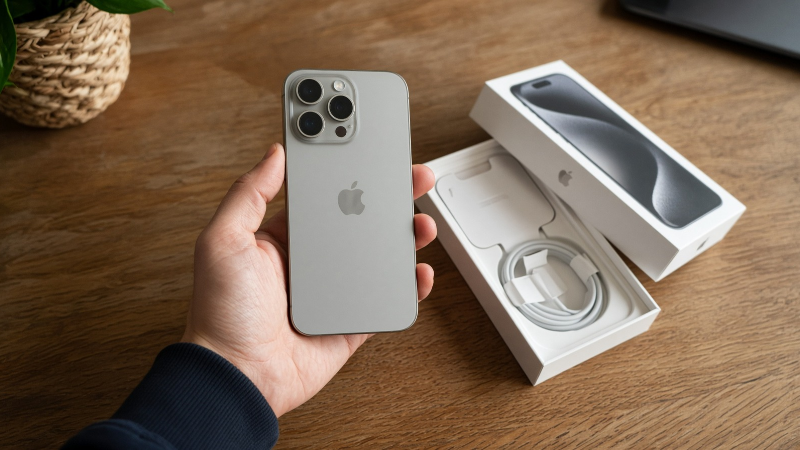
Although both devices arrived in 2023, they offer features that remain useful for everyday communication. The iPhone 15 Pro includes an A17 Pro chip, a titanium design, USB-C connectivity, and advanced cameras. Meanwhile, the larger Pro Max model provides a bigger display and a longer optical zoom capability.
Therefore, consumers researching the 15 pro max release date may be comparing older premium devices with newer, more expensive alternatives. A refurbished or previously owned iPhone 15 Pro could be worth evaluating, provided its battery condition, carrier compatibility, warranty, and final price meet your needs.
Where can low-income households find iPhone service options?
Finding free iPhone service for low income consumers involves comparing eligible wireless providers, checking network coverage, and understanding whether a compatible personal phone can be activated.
Consider these options before choosing a plan:
- Lifeline participating providers: Search for eligible companies serving your ZIP code. Some offer service without additional monthly charges, while others provide discounted plans with different data allowances.
- Bring Your Own Phone plans: If you already own an unlocked iPhone 15 Pro, ask whether the company supports its cellular bands, activation requirements, and eSIM capabilities.
- Promotional device offers: Some providers include a basic smartphone when customers enroll. However, premium Apple devices are not guaranteed, and models may vary by location.
- Refurbished iPhone alternatives: Purchasing a verified refurbished device separately may reduce upfront costs compared with buying a new premium phone.
- Prepaid wireless plans: If Lifeline service is unavailable or unsuitable, compare prepaid carriers for affordable data, calling features, and compatible iPhone service.
Importantly, Lifeline generally allows only one benefit per household. Therefore, compare the complete service arrangement rather than assuming multiple household members can each receive a separate federal discount.
Are there extra costs when using an iPhone with Lifeline?
Although Lifeline can lower monthly communication expenses, using a premium smartphone may involve separate costs. For instance, buying a refurbished iPhone, requesting a replacement device, or activating an optional upgrade can create expenses outside the federal benefit.
Similarly, device financing deserves careful attention. Some retailers and carriers offer installment payments, promotional credit arrangements, or trade-in discounts. However, monthly payments, interest rates, credit checks, taxes, and payment obligations depend on the individual agreement. A phone advertised at zero upfront cost is not necessarily free.
Before accepting financing, examine the full purchase price, repayment period, possible late fees, and any required wireless plan. In addition, optional phone insurance and extended warranties can increase total ownership costs. Comparing these charges supports better financial planning and helps avoid unnecessary debt.
Check the Full Cost Before Accepting an Offer
A $0 upfront advertisement may still involve device installments, service charges, taxes, or promotional conditions.
Ask the provider for written terms showing the device price, recurring charges, financing conditions, and any additional fees.
How to apply for Lifeline and check iPhone availability
Applying through official channels is the safest way to determine eligibility and explore available wireless plans. Since no federal agency guarantees a free iPhone 15 Pro, the process should focus on qualifying for the service benefit first.
- Review eligibility requirements. Visit Lifeline’s official eligibility page to check income limits and approved assistance programs.
- Prepare your documents. Gather identification information and any supporting proof of income or government assistance that may be required.
- Start your official application. Follow the instructions at LifelineSupport.org. Most applicants can apply online, by mail, or with help from a participating provider.
- Complete eligibility verification. The National Verifier checks submitted information in most states. Oregon and Texas have separate state application procedures.
- Find participating companies. Use the official provider directory to search by ZIP code or city and state.
- Ask about iPhone compatibility. Confirm whether the provider accepts unlocked iPhone 15 Pro devices, supports the necessary activation method, and offers sufficient network coverage.
- Verify promotional device availability. If a provider advertises a free phone, request the exact model and written offer terms before enrolling.
- Complete enrollment. Review the monthly plan, activation requirements, optional charges, and service conditions before confirming your selection.
Once your eligibility is approved, remember that you must still enroll with a participating provider. Approval does not automatically activate service or reserve a particular phone model.
Can you bring your own iPhone 15 Pro to a Lifeline provider?
For consumers who already own an iPhone 15 Pro, bringing the device to a participating provider may be a practical alternative. However, compatibility depends on the carrier’s network, device unlocking status, and supported SIM or eSIM activation procedures.
Because U.S. iPhone 15 Pro models use eSIM rather than a physical SIM tray, confirming eSIM support is especially important. A provider that offers Lifeline service may not support every activation method or device configuration.
Furthermore, consumers should verify whether the phone is fully paid off, free of carrier restrictions, and eligible for activation. These checks can prevent wasted enrollment time and unexpected device replacement expenses.
How to choose the best affordable iPhone service in 2026
The strongest financial advantage of Lifeline is its potential to lower recurring communication bills. For eligible households, reducing these costs can make essential services more manageable without taking on a personal loan or signing a device financing agreement.
Nevertheless, an attractive phone advertisement should not replace careful comparison. Review network quality, data allowances, device compatibility, customer support, optional fees, and the actual terms of any promotional equipment offer.
For consumers seeking a free iPhone and service for low income households, it’s especially important to distinguish verified Lifeline benefits from retailer promotions and third-party advertisements. A free phone may be available under certain provider conditions, but a specific iPhone 15 Pro is not guaranteed.
Ultimately, start with the official Lifeline eligibility process, compare participating companies, and choose an affordable plan that fits your needs. If the iPhone 15 Pro remains outside your budget, using an existing compatible device or purchasing a carefully inspected refurbished model may offer a more responsible long-term solution.
Official Sources & Transparency
Program information and device specifications are based on official resources:
Lifeline Program | Eligibility | Providers | Apple iPhone 15 Pro
Independent informational content. Not affiliated with or endorsed by the U.S. government, Apple, or participating wireless providers. Eligibility requirements, promotional offers, and service availability may change.
Deixe um comentário