
Best CRM software for small businesses
Running a small business involves more than attracting new customers. Every missed follow-up, forgotten sales opportunity, or disorganized contact record can translate into lost revenue. As businesses grow, spreadsheets and scattered email conversations often become inefficient ways to manage customer relationships.
CRM software offers a practical solution by organizing customer information, tracking sales pipelines, and automating repetitive tasks. Modern platforms also provide reporting tools, marketing integrations, and financial insights that help business owners make more informed decisions.
Choosing the right customer relationship management system, however, requires careful consideration. Subscription pricing, automation capabilities, ease of use, and long-term operating costs can vary significantly. This guide compares five CRM platforms worth considering in 2026 and explains how to select one that fits your company’s budget.
Why small businesses need CRM software
Customer relationship management software centralizes information about leads, customers, sales activities, and ongoing business opportunities. Instead of switching between spreadsheets, email inboxes, and disconnected applications, employees can work from a shared system that records important interactions.
For small businesses, this organization can improve sales efficiency and reduce administrative work. Automated reminders help sales representatives contact prospects at appropriate times, while pipeline dashboards show which opportunities are approaching completion and where potential revenue may be delayed.
CRM systems can also support financial planning. By monitoring deal values, conversion rates, and expected sales, companies gain a clearer view of their revenue pipeline. These forecasts are useful for budgeting, managing operating expenses, and evaluating whether additional investments in marketing or staff are financially sustainable.
The 5 best CRM software platforms for small businesses
The best CRM depends on how a company manages customers and generates revenue. Some platforms prioritize simplicity and affordability, while others provide sophisticated sales automation and extensive integrations.
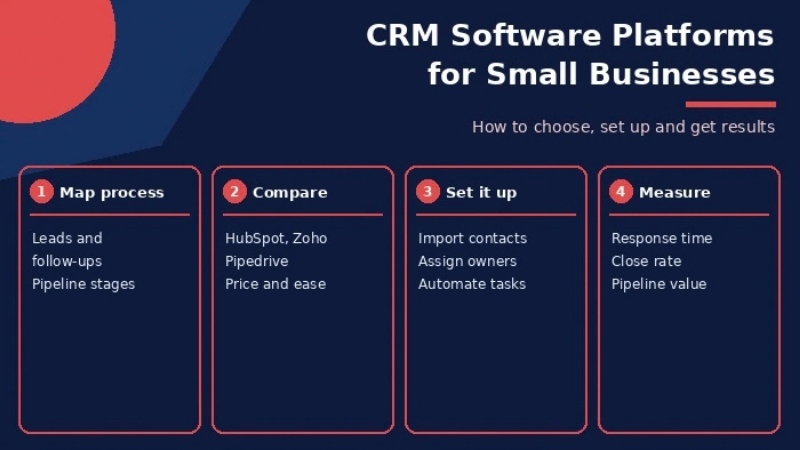
These five solutions offer different advantages for small businesses:
- HubSpot CRM — Best for beginners and growing teamsHubSpot provides a free CRM option for up to two users, including contact management and essential sales tools. Its broader platform combines marketing, customer service, and sales capabilities, making it attractive for businesses planning to expand their digital operations. Paid Sales Hub plans introduce additional automation and reporting features, but advanced subscriptions and onboarding requirements can increase costs.
- Zoho CRM — Best for customization and affordabilityZoho CRM offers a free edition for up to three users and paid plans beginning at $14 per user per month when billed annually. Its features include lead management, workflow automation, reporting, and customizable sales processes. Businesses willing to invest time in configuration may benefit from its flexibility, though the number of settings can initially feel overwhelming.
- Pipedrive — Best for visual sales pipeline managementPipedrive focuses on helping sales teams track deals through clearly defined stages. Its Lite plan starts at $14 per user per month with annual billing. Features include lead management, pipeline tracking, reporting, and integrations with external applications. It is particularly useful for sales-focused businesses, but advanced automation and additional tools may require higher-priced plans.
- Freshsales — Best for sales communication and automationFreshsales combines contact management, sales pipelines, and communication tools in one environment. It offers a free plan for up to three users, while its Growth plan starts at $9 per user per month with annual billing. Higher plans introduce more advanced sales intelligence and automation capabilities, making it suitable for companies seeking to improve customer engagement.
- Less Annoying CRM — Best for straightforward pricingLess Annoying CRM is designed for businesses that want essential CRM functions without complicated subscription tiers. Its pricing is $15 per user per month, plus applicable taxes, with a 30-day free trial. It includes contact organization, task management, customizable pipelines, and customer support. Its simplicity is appealing, though businesses requiring sophisticated marketing automation may prefer another platform.
All five platforms serve legitimate business needs, but their relative value depends on team size, required features, and the amount a company can invest in implementation.
How much does CRM software cost in 2026?
CRM pricing typically follows a subscription model based on the number of users and the features included. Entry-level solutions may be free or cost less than $20 per user each month, while advanced sales automation platforms can exceed $100 per user monthly.
Businesses should pay close attention to billing frequency. A subscription advertised at $14 per user per month may require annual payment, meaning a five-person team could commit to $840 for a full year before accounting for additional services or taxes.
More sophisticated plans may introduce charges for implementation, data storage, AI features, integrations, or additional customer records. Comparing the complete annual software expense provides a more reliable financial picture than evaluating the lowest advertised monthly price.
Essential CRM features worth paying for
Not every small business needs enterprise-level software. The most valuable CRM features are those that directly improve customer management, reduce administrative work, or provide better visibility into sales performance.
Before choosing a subscription, evaluate these capabilities:
- Contact and lead management: A useful CRM stores customer details, communication history, relevant notes, and upcoming activities in organized records accessible to authorized employees.
- Sales pipeline tracking: Visual pipelines help teams monitor opportunities from initial contact through negotiation and closing. This makes it easier to identify delayed deals and prioritize promising prospects.
- Workflow automation: Automated reminders, task assignments, and follow-up sequences reduce repetitive administrative work. More advanced automation may require an upgraded subscription.
- Reporting and revenue forecasting: Dashboards should help business owners track conversion rates, deal values, sales performance, and expected revenue without relying entirely on manual spreadsheets.
- Integration capabilities: Connections with email platforms, accounting software, payment processors, and marketing applications can reduce duplicate data entry and improve operational efficiency.
- Data protection and user permissions: Role-based access, authentication controls, data export capabilities, and appropriate privacy safeguards are important when handling sensitive customer information.
The goal is not to purchase the platform with the longest feature list. It is to identify the capabilities employees will consistently use and determine whether their benefits justify the subscription cost.
Free CRM versus paid CRM: Which offers better value?
Free CRM software can be a practical starting point for freelancers, startups, and businesses with limited customer databases. Basic contact management, sales tracking, and task reminders may be sufficient when only one or two employees manage customer relationships.
Paid subscriptions become more valuable when manual processes start slowing operations. Sales teams managing larger pipelines may need automated workflows, expanded reporting, customer segmentation, and integrations with marketing or accounting platforms.
A free plan is not necessarily cheaper over time if its limitations create additional administrative expenses. Conversely, purchasing advanced software before a business needs its capabilities can reduce profitability without improving sales performance. The best decision depends on measurable operational requirements.
How to choose and set up CRM software step by step
Selecting CRM software should begin with understanding how customers move through your business, from their first interaction to completed purchases and repeat sales.
A structured evaluation process can help prevent expensive migrations and unnecessary subscription commitments.
- Identify your business objectives. Determine whether the primary goal is managing leads, improving follow-up communication, tracking sales revenue, or automating customer interactions. Clearly defined objectives make software comparisons more meaningful.
- Establish an annual software budget. Consider subscription fees, employee licenses, implementation time, training expenses, and paid integrations. Calculate the total cost rather than focusing only on monthly pricing.
- Compare official CRM platforms. Explore the product information and current plans from HubSpot, Zoho CRM, Pipedrive, Freshsales, and Less Annoying CRM.
- Test the software before subscribing. Use available free plans or trials to create sample contacts, track sales opportunities, assign tasks, and evaluate reporting dashboards. Include the employees who will use the platform regularly.
- Check integrations and security controls. Confirm compatibility with your business email, calendar, accounting tools, and marketing systems. Review access permissions, data-export options, and relevant security documentation.
- Import and organize customer information. Clean duplicate records before importing contacts. Establish consistent naming conventions, sales stages, and customer categories so the system remains useful as the database expands.
- Train your team and establish workflows. Explain when employees should update deals, record conversations, and schedule follow-ups. Consistent usage is essential for reliable reports.
- Measure results after implementation. Monitor employee adoption, response times, conversion rates, and administrative hours saved. Reassess the subscription if its financial benefits do not justify its operating costs.
Successful CRM adoption depends as much on business processes as on technology. Even an advanced platform delivers limited value when customer records are incomplete or employees do not use the system consistently.
Can CRM software improve revenue and financial performance?
CRM software does not automatically generate sales, but it can provide the structure needed to identify opportunities and improve customer retention. Better follow-up management may reduce missed prospects, while organized customer histories can support more relevant conversations and stronger long-term relationships.
Sales forecasting tools also help businesses connect expected revenue with financial decisions. A company considering new equipment financing, a business credit card, or additional employees can use pipeline information to assess growth expectations. Forecasted deals should never be treated as guaranteed cash flow, however.
To evaluate return on investment, business owners can compare measurable benefits such as time saved, reduced administrative expenses, and incremental gross profit against subscription and implementation costs. This approach is more reliable than assuming every automation feature will produce immediate revenue growth.
Which CRM software is the best choice for your business?
There is no single CRM platform that suits every small business. HubSpot is a strong starting point for companies interested in combining sales and marketing tools, while Zoho CRM offers flexibility for businesses seeking customization at an accessible price.
Pipedrive may be preferable for teams focused heavily on managing sales opportunities. Freshsales offers an appealing combination of communication and workflow tools, while Less Annoying CRM is worth considering when straightforward pricing and simplicity are priorities.
Before committing to an annual subscription, review contractual terms, cancellation policies, potential price increases, user limits, and data-export conditions. Companies should also consider how easily the platform can adapt as staffing, customer volume, and operational needs change.
Deixe um comentário