
Best cloud backup services in 2026
Losing important files can be expensive. A failed hard drive, ransomware attack, accidental deletion, or stolen laptop can destroy years of personal information and valuable business records. For companies handling customer data, the financial consequences may include operational disruptions, recovery expenses, and lost revenue.
Cloud backup services offer a practical way to protect digital information by automatically storing recoverable copies on remote servers. Unlike ordinary file synchronization, dedicated backup software is designed to preserve data and support recovery when something goes wrong.
Choosing the right provider, however, requires more than comparing storage capacity. Subscription pricing, encryption standards, recovery options, and device compatibility all influence long-term value. This guide examines five cloud backup solutions worth considering in 2026 and explains how to identify the best option for your needs.
How cloud backup services protect your data
Cloud backup services create additional copies of files and transfer them to remote storage infrastructure. Depending on the software, backups may run continuously, follow a scheduled routine, or preserve complete system images that can help restore a computer after hardware failure.
This approach differs from standard cloud storage. Services focused primarily on synchronization may propagate accidental deletions or unwanted file changes across connected devices. Dedicated backup platforms often provide version history and recovery features that help retrieve earlier copies.
For businesses, reliable backup is an important part of financial risk management. Protecting accounting records, customer databases, contracts, and operational documents can reduce downtime and support business continuity. Still, no backup provider can eliminate every cybersecurity threat, making recovery testing and access security essential.
The 5 best cloud backup services to consider in 2026
The right cloud backup solution depends on the number of devices, total storage requirements, security expectations, and available budget. Some platforms emphasize unlimited computer backup, while others offer advanced protection for businesses.
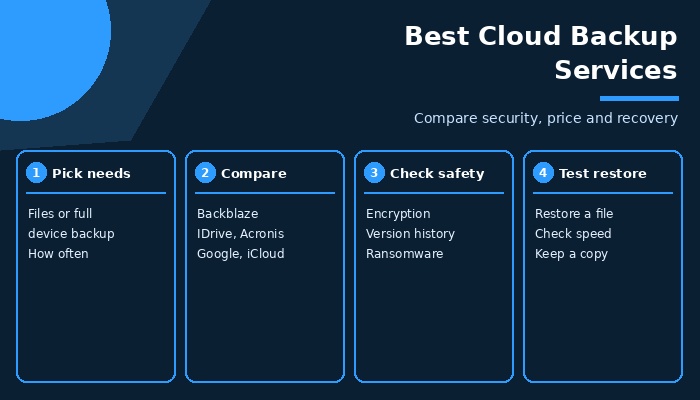
Here are five options with different strengths:
- Backblaze — Best for simple, unlimited computer backup
Backblaze provides automatic cloud backup for Windows and Mac computers. Its Personal Backup plan includes unlimited data storage for one computer, with continuous backup and file recovery features. Pricing is $9 per month or $99 per year. It is a practical choice for individuals who want straightforward protection without managing storage limits, though backing up additional computers requires separate coverage.
- IDrive — Best for multiple devices and flexible storage
IDrive supports backup across multiple computers under one personal account, with separate Team and Business options. Its Personal plan offers 5 TB for $11.99 monthly, while annual promotional pricing may be lower. The provider also offers a free 10 GB plan. This structure suits users managing several devices, but storage allowances and renewal pricing require attention.
- Acronis True Image — Best for backup and cybersecurity
Acronis combines file backup, system recovery, and anti-malware capabilities. Its software supports local backups and, with an eligible subscription, cloud protection. Acronis advertises plans starting at $49.99 annually, but its entry-level Essentials plan does not include cloud storage. Customers requiring online backup should select a qualifying cloud-enabled package.
- Carbonite — Best for automatic personal file protection
Carbonite offers continuous cloud backup with unlimited storage for one computer. Its Basic plan has a regular annual price of $95.99, with promotional discounts sometimes available. Higher tiers add features such as external hard drive protection and automatic video backup. It is suitable for users who prioritize uncomplicated file recovery rather than advanced enterprise controls.
- Backblaze Business Backup — Best for small teams needing unlimited device backup
Backblaze also offers a business backup service priced at $99 per computer annually. It combines unlimited data backup with centralized administration and user management. This can suit small organizations with several workstations, although the total subscription cost increases with each protected computer.
Each service has different limitations involving operating systems, storage quotas, included devices, and recovery methods. Comparing those restrictions is just as important as checking advertised prices.
How much does cloud backup cost in 2026?
Cloud backup pricing varies according to storage capacity, device count, subscription duration, and additional cybersecurity features. Personal plans commonly cost less than $15 per month, while business solutions may become substantially more expensive as the number of protected devices increases.
Some services charge per computer, while others provide a shared storage allowance across several devices. For example, unlimited backup for one computer may be more economical than purchasing multiple licenses, but a multi-device storage plan could offer better value for a household or small office.
Businesses should also consider data recovery charges, additional storage fees, introductory discounts, and renewal conditions. The lowest advertised monthly rate does not always reflect the actual annual cost of maintaining reliable data protection.
Security features every backup service should offer
A cloud backup subscription should do more than store files remotely. Effective protection depends on how information is encrypted, who can access it, and how quickly previous versions can be restored following a security incident.
Several features deserve attention:
- Encryption during transfer and storage: Strong encryption helps protect data from unauthorized access while files travel between devices and remote servers. Users should review how encryption keys are managed and whether private encryption options are available.
- Multi-factor authentication: Additional verification strengthens account security beyond a password. This reduces the risk of unauthorized account access when login credentials are compromised.
- Automatic backup scheduling: Continuous or scheduled backups reduce dependence on manual action. Businesses should select backup intervals based on how much recent information they can afford to lose.
- File version history: Versioning allows users to retrieve earlier copies after accidental changes, corruption, or certain ransomware incidents. Retention periods vary considerably between services.
- Ransomware recovery capabilities: Some platforms offer protected backups, recovery points, or malware detection. These tools can improve resilience, but they should complement endpoint security and employee training.
- Recovery and disaster restoration: A dependable service should provide accessible recovery tools, clear documentation, and realistic restoration procedures. Large datasets may require physical recovery media or extended download times.
For organizations managing sensitive customer information, access controls, audit records, and compliance requirements may also influence the choice of provider.
Is unlimited cloud backup better than limited storage?
Unlimited backup can offer attractive long-term value for users with large photo libraries, video collections, or growing work archives. Instead of calculating storage requirements every month, customers receive a plan without a conventional data capacity limit for the covered computer.
However, unlimited storage does not necessarily mean unlimited device coverage. Certain plans protect only one computer, exclude network-attached storage, or apply special rules to external drives and deleted files.
Limited-capacity services may provide greater flexibility when protecting several computers or servers under one account. A company with five modestly sized workstations, for instance, might find a shared 5 TB plan more economical than purchasing five separate unlimited subscriptions.
How to choose and set up a cloud backup service
Selecting cloud backup software begins with identifying which information must be protected and how quickly it needs to be restored. A thoughtful setup process can reduce unnecessary subscription expenses while improving data recovery readiness.
Follow these steps to establish a reliable backup system:
- Identify your most important files. Review financial documents, photographs, customer records, contracts, databases, and other information that would be difficult or expensive to replace.
- Calculate storage requirements. Check how much data currently occupies your devices and allow room for future growth. Businesses should also account for backup versions and retention periods.
- Compare official pricing and features. Visit the websites of Backblaze, IDrive, Acronis, and Carbonite to evaluate current subscriptions and supported devices.
- Choose appropriate security settings. Enable multi-factor authentication where available, use a strong unique password, and review encryption and access permissions before uploading sensitive information.
- Install the backup application. Download the provider’s official software and select the folders, drives, or complete systems that require protection. Confirm any restrictions on external drives or servers.
- Configure automatic backups. Establish continuous or scheduled protection according to your needs. For important business systems, shorter backup intervals can help minimize potential data loss.
- Complete the initial upload. Keep the device connected while the first backup finishes. Large datasets may require substantial upload time depending on internet speed and provider limitations.
- Test file restoration. Recover a sample document and verify that it opens correctly. Repeat testing periodically to confirm that the backup remains usable.
For stronger protection, consider the 3-2-1 backup strategy: maintain three copies of important data, use two types of storage, and keep one copy off-site. A cloud subscription can form part of this approach without replacing other recovery safeguards.
Can cloud backup reduce business financial risks?
For small businesses, data loss can interrupt sales, delay customer service, and compromise essential operational records. Reliable backups can reduce recovery challenges by preserving information needed to resume normal activities after an incident.
The financial value of backup depends on the organization. A freelancer protecting design files faces different risks from a company storing years of accounting records, customer contracts, and transaction histories.
Business owners should compare annual backup expenses with the potential cost of downtime, lost productivity, professional data recovery, and rebuilding damaged records. This assessment helps establish whether basic cloud backup is sufficient or whether a more comprehensive disaster recovery solution is justified.
Which cloud backup service is worth choosing in 2026?
Backblaze is an attractive option for individuals seeking unlimited automatic backup for a single computer, while IDrive offers flexibility for households and users protecting multiple devices.
Acronis True Image is worth considering when system recovery and integrated cybersecurity are important. Carbonite provides another straightforward option for personal file protection, particularly for users who prefer automatic backup without managing storage quotas. Small businesses should compare dedicated administrative features and licensing arrangements before selecting a provider.
Before subscribing, examine renewal pricing, file retention limits, supported devices, encryption settings, and recovery procedures. An inexpensive plan can become a costly mistake if it fails to protect the specific files or systems you depend on.
Deixe um comentário