
Best antivirus software for Windows
A single malicious download can turn an ordinary workday into an expensive problem. From ransomware that locks important documents to phishing attacks targeting banking credentials, modern cyber threats can disrupt both personal finances and business operations. Consequently, protecting a Windows computer is no longer just about avoiding traditional viruses.
Antivirus software has evolved into a broader cybersecurity solution. Today’s leading programs use real-time threat detection, behavioral monitoring, malicious website protection, and automated security updates to help defend computers against increasingly sophisticated attacks.
However, not every security package offers the same benefits. Some include VPN access, password managers, and cloud backup, while others focus on essential malware protection at a lower price. This guide compares five Windows antivirus solutions worth considering in 2026, with attention to protection, performance, and long-term subscription value.
Why Windows computers still need antivirus protection
Windows 11 includes Microsoft Defender Antivirus, providing built-in real-time protection against viruses, ransomware, spyware, and other malicious software. For many everyday users, this integrated security system offers a reasonable starting point without requiring another subscription.
Nevertheless, cybercriminals continually develop new methods to compromise devices. Malicious email attachments, fake software updates, fraudulent shopping websites, and infected downloads can expose personal information or interfere with legitimate financial transactions.
As a result, dedicated antivirus software may be valuable for people who need additional web protection, identity-monitoring features, centralized device management, or bundled recovery tools. The decision should depend on actual security requirements rather than assuming every paid product is automatically safer.
The 5 best antivirus software options for Windows in 2026
Choosing the right antivirus requires balancing malware detection, system performance, usability, and subscription costs. Independent testing also matters: in AV-TEST’s August 2026 Windows 11 evaluation, several established products achieved the maximum protection score.
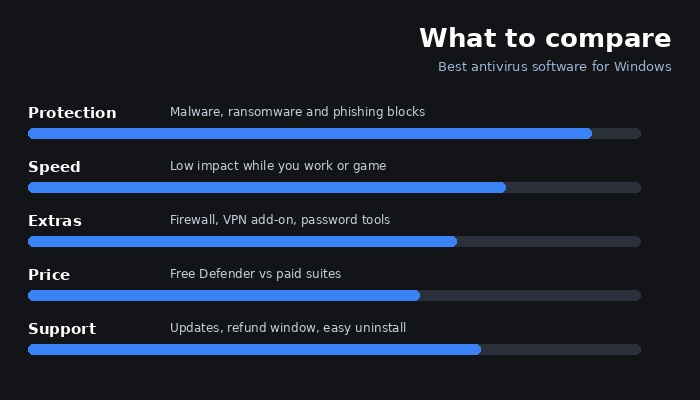
Here are five strong options for different users:
- Bitdefender Total Security — Best for comprehensive protection
Bitdefender Total Security combines real-time malware detection, ransomware defense, anti-phishing tools, and additional device security features. Its protection technology monitors suspicious behavior rather than relying exclusively on known virus signatures. In August 2026, it earned maximum scores for protection, performance, and usability in AV-TEST’s evaluation. However, customers should compare device allowances and renewal prices before subscribing.
- Norton 360 Deluxe — Best for families and multiple devices
Norton 360 Deluxe offers antivirus protection alongside a VPN, password manager, parental controls, dark web monitoring, and cloud backup for Windows PCs. Plans typically cover up to five devices, making this an appealing package for households managing several computers and smartphones. Norton also received maximum scores across all three categories in AV-TEST’s August 2026 evaluation. Subscription pricing varies by region, and introductory discounts may not apply at renewal.
- ESET HOME Security — Best for flexible security management
ESET provides malware detection, anti-phishing protection, and additional security capabilities depending on the subscription tier. Its security products offer configurable settings that may appeal to experienced Windows users. ESET Security Ultimate received maximum scores in AV-TEST’s August 2026 evaluation. Since features differ between Essential, Premium, and Ultimate plans, buyers should verify which protections are included before purchasing.
- Malwarebytes Premium Security — Best for focused malware protection
Malwarebytes emphasizes protection against malware, ransomware, malicious websites, and suspicious software behavior. Its Premium Security products include real-time protection, while the free scanner is primarily designed for on-demand detection and removal. Malwarebytes Premium achieved maximum scores across the three AV-TEST categories in August 2026. It is particularly worth considering for users who prefer a security-focused package without necessarily purchasing a large collection of unrelated tools.
- Microsoft Defender Antivirus — Best free Windows protection
Microsoft Defender Antivirus is integrated into Windows 11 and does not require a separate antivirus subscription. It provides real-time malware scanning, threat notifications, and integration with Windows Security features. In AV-TEST’s August 2026 results, Defender earned 6 out of 6 for protection, 5.5 for performance, and 6 for usability. For users with straightforward needs, it may eliminate the expense of additional antivirus software.
These recommendations reflect published capabilities and independent laboratory results rather than a separate hands-on test of every product.
How much does Windows antivirus software cost?
Antivirus pricing varies according to the number of protected devices, subscription duration, and included cybersecurity features. Basic paid plans may cost a few dollars per month when purchased annually, while comprehensive packages with identity monitoring or VPN services can cost considerably more.
Importantly, the advertised monthly price often represents an annual subscription divided into twelve payments for comparison. Customers may still need to pay the full amount upfront. Furthermore, introductory discounts frequently expire after the initial billing period.
Before purchasing, examine the regular renewal price, supported devices, refund conditions, and availability of optional features. A more expensive security suite may offer reasonable value if it replaces separate subscriptions, but unnecessary bundled services can increase operating expenses without improving protection.
Essential antivirus features worth paying for
A dependable antivirus should protect against current threats without making the computer difficult to use. Instead of selecting software based on the longest feature list, prioritize capabilities that address realistic security risks.
Several features deserve attention:
- Real-time malware protection: Continuous monitoring helps detect suspicious programs before they execute harmful actions. Effective software combines known threat signatures with behavioral analysis and regularly updated detection methods.
- Ransomware defense: Modern ransomware can encrypt files and interrupt business operations. Antivirus tools may help block suspicious encryption activity, but independent backups remain necessary for reliable recovery.
- Phishing and malicious website blocking: Fraudulent websites can imitate banks, shopping platforms, and financial institutions. Web protection tools may identify dangerous destinations before users enter passwords or payment information.
- Low system impact: Antivirus software should provide dependable protection without noticeably disrupting normal work. Independent performance tests can help identify products that balance security with efficient resource usage.
- Security updates and threat intelligence: Frequent updates allow antivirus products to respond to emerging malware. Automatic updating is particularly important for users who rarely review security settings.
- Account and privacy protection: Some subscriptions offer password managers, VPN access, identity monitoring, or data breach alerts. These features can be useful, but availability and coverage vary by plan.
Ultimately, strong protection depends on both software capabilities and responsible user behavior.
Is free antivirus software enough for Windows 11?
For many home users, Microsoft Defender provides meaningful protection without additional subscription expenses. It operates within Windows Security and receives updates through Microsoft’s security infrastructure.
However, free protection does not automatically cover every cybersecurity need. Users handling confidential business records, operating several devices, or wanting bundled identity monitoring may find greater convenience in a paid security package.
On the other hand, purchasing antivirus software does not guarantee protection against every attack. Phishing, stolen passwords, malicious browser extensions, and compromised accounts can still cause financial harm. Therefore, users should combine antivirus protection with multifactor authentication, operating system updates, and secure backups.
How to choose and install antivirus software step by step
Selecting antivirus software begins with understanding which devices and information require protection. A personal laptop used for browsing has different security needs from a computer storing customer records, accounting files, or business contracts.
Follow these steps to evaluate and configure a suitable solution:
- Assess your security requirements. Identify the Windows computers you need to protect, the types of files they contain, and whether you need additional services such as VPN access, ransomware safeguards, or cloud backup.
- Review independent test results. Consult the AV-TEST Windows antivirus evaluations to compare malware protection, performance, and usability using published laboratory results.
- Compare official software options. Explore Bitdefender, Norton, ESET, Malwarebytes, and Microsoft Defender to review supported devices and current product features.
- Calculate the complete subscription cost. Check introductory prices, annual billing requirements, device limits, renewal charges, and cancellation policies before selecting a paid plan.
- Download software from the official source. Avoid unknown download portals and websites advertising suspiciously discounted activation keys. Verify the publisher before installing security applications.
For users relying on Microsoft Defender, the built-in Windows Security application provides access to scans, protection history, firewall settings, and related security controls.
Can antivirus software protect online banking and financial accounts?
Antivirus software can reduce certain risks associated with financial activity online. For example, it may detect malware designed to steal login credentials, block known phishing websites, or identify malicious attachments disguised as invoices and payment confirmations.
Nevertheless, antivirus protection cannot prevent every form of financial fraud. Criminals may persuade users to authorize transactions, reveal verification codes, or transfer money through legitimate banking applications.
Consequently, online banking security should also include strong account passwords, multifactor authentication, transaction alerts, and careful verification of payment requests. Users should access financial institutions through official websites or applications rather than unfamiliar links.
Which Windows antivirus software is worth choosing in 2026?
Bitdefender Total Security is a compelling option for users seeking comprehensive malware protection, while Norton 360 Deluxe offers additional value for households that want multiple security services under one subscription.
ESET HOME Security may suit people who prefer configurable protection, and Malwarebytes is worth considering for focused defense against malicious software. Meanwhile, Microsoft Defender remains an accessible alternative for users who want reliable built-in protection without recurring antivirus fees.
Before committing to a paid package, compare independent testing, renewal prices, included features, and device compatibility. Also consider whether additional services duplicate protections you already receive through Windows or other subscriptions.
The best antivirus software is not necessarily the most expensive product. It is the solution that provides dependable security, fits your computing habits, and protects important information without creating unnecessary costs. Combined with careful browsing, regular updates, and reliable backups, a well-chosen antivirus can form an important part of a practical digital security strategy.
Deixe um comentário