
Best accounting software for freelancers
Top 5 accounting software for freelancers in 2026: Features, pricing and best picks
Managing freelance finances can become surprisingly complicated. Between unpaid invoices, business expenses, tax obligations, and unpredictable monthly income, independent professionals often spend valuable hours organizing transactions instead of serving clients. Without reliable financial records, even a profitable freelance business can experience cash flow problems.
Accounting software helps simplify these responsibilities by centralizing income tracking, expense management, invoicing, and financial reporting. Many cloud-based platforms also connect with business bank accounts, accept online payments, and provide information useful for tax preparation.
However, choosing the right platform requires more than comparing subscription prices. Transaction fees, automation features, reporting capabilities, and long-term costs can influence which service delivers the greatest value. This guide examines five accounting solutions worth considering in 2026 and explains how freelancers can select software that supports sustainable business growth.
Why freelancers need accounting software
Freelancers manage many of the same financial responsibilities as established companies, often without a dedicated accounting department. Tracking project income, monitoring deductible expenses, and preparing accurate invoices are essential for maintaining financial stability.
Modern accounting software organizes these activities in a single digital workspace. Depending on the provider, users can connect bank accounts, categorize business transactions, generate profit-and-loss reports, and monitor outstanding client payments.
These capabilities also support broader financial planning. Accurate records help independent professionals evaluate profitability, prepare estimated tax payments, and understand how much income remains after operating expenses. Reliable financial statements may also be useful when applying for business financing or discussing financial needs with an accountant.
The 5 best accounting software platforms for freelancers
The best accounting platform depends on the freelancer’s workload, number of clients, reporting needs, and available budget. Some products emphasize easy invoicing, while others offer more comprehensive bookkeeping capabilities.
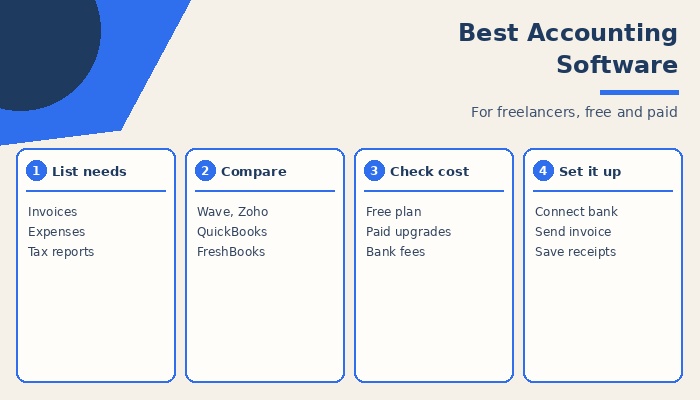
Here are five options worth evaluating:
- QuickBooks — Best for freelancers planning to grow
QuickBooks offers accounting features for self-employed professionals, including income tracking, expense categorization, invoicing, and financial reports. Its current U.S. Solopreneur lineup includes a free option with limited functionality and a Lite plan listed at $20 per month before promotional discounts. QuickBooks Simple Start is listed at $38 monthly and provides broader accounting functionality and accountant access. It is useful for freelancers expecting their operations to become more complex.
- FreshBooks — Best for client invoicing and project-based work
FreshBooks focuses on invoicing, expense management, estimates, and client payments. Its Lite plan costs $23 per month at the regular U.S. monthly rate and supports invoicing up to five clients. The Plus plan costs $43 monthly and increases that allowance to 50 clients while adding reporting and other capabilities. Its interface is attractive for service professionals, although client limits and add-on charges may influence the total cost.
- Wave — Best for freelancers on a limited budget
Wave provides a free Starter plan with unlimited estimates, invoices, and basic bookkeeping records. Its Pro plan costs $19 per month or $190 annually in the United States, adding automatic bank transaction imports, receipt capture, and other time-saving features. Wave is a practical starting point for independent professionals who want to manage accounting expenses carefully.
- Zoho Books — Best for affordable accounting automation
Zoho Books provides a free accounting plan for qualifying small businesses with annual revenue of $50,000 or less. The free edition includes invoicing, expense recording, bank reconciliation, and financial reporting. Its Standard plan costs $15 per month when billed annually or $20 with monthly billing. It offers a useful combination of affordability, customization, and financial management features.
- Xero — Best for freelancers needing detailed financial reporting
Xero offers bank reconciliation, invoicing, financial reporting, and cloud-based bookkeeping. Its Early plan costs $27 per month at the regular U.S. rate, with limits of 20 invoices and five bills. The Growing plan costs $59 monthly and provides expanded functionality. Xero may appeal to freelancers collaborating with accountants or preparing to operate a larger business.
Each platform has different strengths. The most suitable option depends on how frequently you invoice customers, whether you need automated bank reconciliation, and how extensively you expect to use financial reporting tools.
How much does freelance accounting software cost?
Accounting software subscriptions range from free plans with limited functionality to advanced packages costing more than $50 per month. The advertised price usually depends on included features, payment frequency, and eligibility for introductory promotions.
Freelancers should calculate the annual cost rather than focusing exclusively on a temporary discount. A $20 monthly subscription represents $240 annually before taxes and additional service charges. Payment processing, payroll integrations, and extra users may increase expenses.
It is also important to distinguish accounting fees from financial transaction costs. Accepting client payments by credit card may involve processing charges separate from the software subscription. These expenses can affect profitability, especially for freelancers handling numerous smaller invoices.
Essential accounting features freelancers should compare
A good accounting system should reduce administrative work while providing accurate information about business performance. Paying for sophisticated features that rarely get used can create unnecessary operating expenses.
When comparing platforms, consider these capabilities:
- Professional invoicing: The software should create accurate invoices, track outstanding balances, and allow clients to pay through supported methods. Recurring invoices and automated reminders are useful for freelancers with ongoing contracts.
- Expense tracking and categorization: Organizing business purchases helps identify operating costs and simplifies bookkeeping. Receipt capture can reduce the need to maintain separate paper records.
- Bank account synchronization: Secure bank connections can import transactions and simplify reconciliation. Availability depends on the financial institution, account type, and software plan.
- Tax preparation support: Useful features include expense reports, tax category tracking, and records for estimated tax planning. Software-generated information should still be reviewed for accuracy.
- Profit-and-loss reporting: Financial statements help freelancers evaluate revenue, expenses, and business profitability over specific periods.
- Data security and accountant access: Strong authentication, user permissions, data export capabilities, and appropriate financial data protections are important for maintaining trustworthy records.
Freelancers should prioritize accurate bookkeeping and reliable invoicing before investing in advanced forecasting or automation tools.
Free accounting software versus paid plans
Free accounting software can be sufficient for freelancers with a small number of clients and straightforward financial transactions. Basic invoicing, expense tracking, and reporting may provide the structure needed to avoid disorganized spreadsheets.
Paid platforms become more valuable when businesses require automated bank feeds, advanced financial statements, recurring invoices, or additional integrations. These features can save time and improve visibility into financial performance.
The decision should reflect actual workload. If a free plan requires several hours of manual transaction entry each month, an affordable paid subscription might provide better value. Conversely, paying for advanced features without using them consistently may reduce profits unnecessarily.
How to choose and set up accounting software step by step
Choosing accounting software should begin with understanding how money enters and leaves your freelance business. A clear financial workflow makes it easier to select the right platform and avoid costly software changes later.
Follow these steps to establish an efficient accounting system:
- Review your business finances. Identify your monthly income, typical expenses, outstanding invoices, and payment methods. Determine whether you need basic bookkeeping or more comprehensive financial reporting.
- Establish a software budget. Calculate how much you can spend annually on subscriptions, payment processing, and additional services. Consider both standard rates and promotional pricing.
- Compare official accounting platforms. Review the current features and plans offered by QuickBooks, FreshBooks, Wave, Zoho Books, and Xero.
- Test invoicing and reporting features. Use available free plans or trials to create invoices, record sample expenses, and generate financial reports. Confirm that the interface suits your workflow.
- Connect your business financial accounts. Where supported, link your business checking account and review security permissions. Using a separate business account can simplify transaction categorization.
- Import existing financial records. Organize client information, outstanding invoices, and relevant expense records. Check imported balances carefully to prevent duplicate or missing transactions.
- Configure payment and tax settings. Establish invoice terms, applicable tax categories, and payment processing options. Consult a qualified tax professional when unsure about reporting obligations.
- Review reports regularly. Reconcile transactions, monitor unpaid invoices, and examine monthly income and expenses. Export important records periodically and maintain appropriate backups.
A reliable accounting system requires consistent use. Even sophisticated software cannot produce accurate reports when income, expenses, or account balances are recorded incorrectly.
Can accounting software help freelancers save money on taxes?
Accounting software can help freelancers maintain organized financial records and identify expenses that may be relevant when preparing tax returns. Keeping receipts, tracking business purchases, and separating personal expenses from professional costs makes financial reporting easier.
However, software does not automatically determine whether every recorded expense qualifies as a tax deduction. U.S. tax treatment depends on the nature of the expenditure and applicable Internal Revenue Service rules. Independent workers may also have estimated tax obligations throughout the year.
Freelancers can consult the IRS Self-Employed Individuals Tax Center for official guidance. When income sources, business expenses, or reporting requirements become complex, working with a qualified tax professional can help reduce compliance risks.
Which accounting software is the best choice for freelancers?
QuickBooks is a practical option for independent professionals who anticipate business growth and need increasingly detailed accounting capabilities. FreshBooks is particularly appealing for client-focused freelancers who frequently prepare invoices and manage project payments.
Wave offers an accessible starting point for budget-conscious workers, while Zoho Books provides strong value for freelancers seeking affordable automation. Xero is worth considering when more detailed financial reporting and collaboration with accounting professionals become priorities.
Before selecting a subscription, review renewal pricing, transaction fees, invoice limits, data-export options, and the availability of customer support. Consider how easily the software can adapt if your business gains new clients, hires contractors, or introduces additional services.
Ultimately, the best accounting software is the platform that keeps financial records accurate, reduces administrative effort, and provides useful insights without consuming an unreasonable portion of your income. A carefully chosen system can strengthen financial management and support more confident business decisions.
Deixe um comentário