
How to Increase Your Rakuten Credit Card Limit
Having a higher credit limit is the desire of thousands of consumers seeking greater purchasing power and financial flexibility. When it comes to the Rakuten card, this pursuit makes even more sense, as the card offers exceptional cashback of up to 10% at partner restaurants and exclusive benefits from the American Express network.
The benefits of increasing the Rakuten card limit go beyond purchasing power. A higher limit provides greater flexibility to installment larger purchases, offers security in emergency situations, and contributes to better financial organization.
Learn the best practices to accelerate approval and discover valuable tips to achieve a higher limit with full responsibility. Continue reading and transform your card into an even more powerful tool to maximize your cashback.
How to Request a Rakuten Card Limit Increase?
The platform offers an intuitive experience, allowing you to make the request in just a few minutes, without the need for lengthy calls or excessive bureaucracy. Using official digital channels ensures security and agility throughout the process.
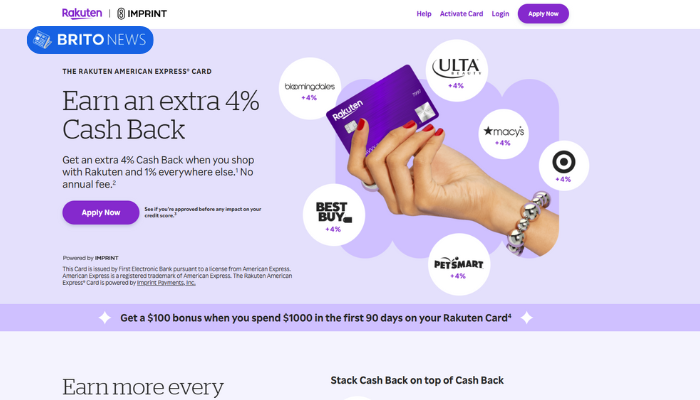
Check out the complete step-by-step guide to request an increase:
- Download the Rakuten app from the App Store or Google Play and log in with your registered credentials.
- Access the credit card management area in the app’s main menu.
- Locate the “Manage Limit” or “Request Limit Increase” option in the settings.
- Check if your registration data is up to date, especially income and employment information.
- Update your income if any positive changes have occurred in recent months.
- Enter the desired new limit amount realistically, compatible with your current income.
- Submit the request and wait for the analysis, which usually takes 24 to 72 business hours.
- Track the request status through the app itself or by email.
Maintaining good card usage practices, such as timely payments and conscious limit utilization, significantly accelerates the approval of your increase request. First Electronic Bank values customers who demonstrate financial responsibility.
Understanding the Rakuten Card Limit
The initial Rakuten card limit is defined by First Electronic Bank, the card issuing institution, based on a careful analysis of various factors. The applicant’s proven income is one of the main criteria, but not the only one.
Credit history, prior relationship with financial institutions, credit score, and even declared spending patterns are considered during the initial evaluation. This multifactorial analysis allows the institution to offer a limit appropriate to each customer’s profile.
It’s important to understand that the Rakuten card limit is not static. The financial institution conducts periodic reviews of its customers’ limits, generally every three to six months.
Best Practices to Increase Your Limit
Financial responsibility and intelligent use of the Rakuten card are the main factors that increase the issuing institution’s confidence in its customers. Banks and fintechs prefer to grant higher limits to people who demonstrate the ability to manage their resources well and honor commitments.
See the 7 best practices to achieve a higher limit:
- Always pay the full invoice on the due date, avoiding interest and penalties.
- Use between 30% and 50% of your available limit regularly, demonstrating active use without compromising payment capacity.
- Keep your registration data always updated, especially income and address information.
- Make purchases through the Rakuten platform to maximize your relationship with the ecosystem.
- Avoid delays in any type of payment, including utility bills and other financial obligations.
- Don’t apply for many credit cards simultaneously, as this can signal risk to institutions.
- Regularly monitor your credit score and work to keep it at high levels.
First Electronic Bank recognizes and values committed customers, increasing their chances of receiving increasingly better limit proposals over time.
How Long Does It Take to Increase the Limit?
The average time to get a Rakuten card limit increase ranges between 3 and 6 months after card issuance or after the last granted increase.
This period is necessary for the financial institution to adequately assess your usage behavior, your payment punctuality, and your ability to manage the provided credit.
It’s essential to understand that the exact time can vary considerably according to each customer’s individual profile. Factors such as credit history in the market, relationship with other financial institutions, income variations, and changes in credit score can accelerate or delay the granting of new increases.
What Is the Maximum Rakuten Card Limit?
There is no fixed and predetermined value for the maximum Rakuten card limit. First Electronic Bank works with a dynamic credit policy, where the limit grows proportionally to conscious use, demonstrated payment capacity, and the evolution of the customer’s relationship with the institution.
The main factors that influence your maximum limit are:
- Proven monthly income and its stability over time.
- Updated credit score at American credit bureaus.
- Length of relationship with Rakuten and card usage frequency.
- History of timely payments and absence of default.
- Income commitment to other debts and financing.
- Volume of purchases made through the Rakuten platform.
- Consumption profile and predominant spending categories on the card.
Your Rakuten card limit is, ultimately, a direct reflection of your financial credibility. The more you demonstrate responsibility, organization, and commitment to your obligations, the greater the chances of achieving increasingly impressive limits.
Can I Request a Limit Increase at Any Time?
Yes, technically you can request a Rakuten card limit increase at any time through the app or official website. However, there are some important caveats you should consider before making your request.
Requesting increases too frequently or at inappropriate times can reduce your approval chances and even signal risky behavior to the financial institution.
If your increase request is denied, don’t be discouraged. Use the denial as an opportunity to review your financial behavior and identify possible improvement points.
Is the Limit Increase Automatic?
Yes, in many cases the Rakuten card limit increase happens completely automatically, without the customer needing to make any request. First Electronic Bank has intelligent systems that continuously monitor customer usage and payment behavior.
To increase your chances of receiving an automatic increase, follow these practices:
- Never delay invoice payment, not even by a single day.
- Always pay the full invoice amount, avoiding revolving credit.
- Use the Rakuten card regularly for daily purchases.
- Keep usage between 30% and 70% of available limit.
- Update your income data whenever there’s a salary increase.
- Make purchases through the Rakuten platform to accumulate more cashback.
- Monitor and constantly work to improve your credit score.
When the system identifies consistent positive patterns, such as timely payments, regular card use, and maintenance of good credit score, it can automatically trigger an increase proposal.
My Request Was Denied. What Now?
Receiving a denial on your Rakuten card limit increase request can be frustrating, but it’s important to understand that this decision is not final. First Electronic Bank constantly reevaluates its customers’ profiles, and a denial today doesn’t mean impossibility of approval in the future.
The most important guidance after a denial is to maintain conscious and responsible card use. Continue paying your invoices in full and on time, use the available limit in a balanced way, and work to improve your credit score.
After 60 to 90 days, you can make a new attempt, preferably updating income information if any improvement has occurred. Patience and financial discipline are your greatest allies in this process.
Does Having a Bad Credit Record Prevent the Increase?
Yes, having a negative credit record at credit protection agencies is one of the main impediments to getting a Rakuten card limit increase.
See the main reasons why credit restrictions harm your increase request:
- Indicates history of default and difficulty in honoring financial commitments.
- Drastically reduces credit score, the main indicator used by institutions.
- Signals risk that new credits granted will also not be paid.
- Demonstrates possible financial disorganization and lack of planning.
- Negatively affects relationship with all financial institutions simultaneously.
- May result in current limit reduction instead of increase.
- Remains in history even after regularization, impacting future analyses for some time.
When your record shows restrictions, First Electronic Bank interprets this situation as a high-risk signal, significantly reducing the institution’s confidence in your ability to honor larger financial commitments.
How Many Times Can I Request an Increase?
In general, you can request a limit increase on the Rakuten card every 3 or 6 months, depending on your relationship history with the institution. There is no formal limit on attempts, but it is highly recommended to respect these intervals to avoid harming your image with First Electronic Bank.
The recommended best practice is to wait at least 90 days after a request, whether approved or denied, before making a new request.
It’s important to differentiate between manual request and automatic increase. While manual request depends on your initiative and is subject to recommended intervals, automatic increase can happen at any time, without prior notice, when First Electronic Bank’s system identifies that your profile deserves a higher limit.
How to Apply for the Rakuten Card?
The Rakuten card application process is completely digital, fast, and secure. Rakuten has developed a modern platform that allows interested parties to complete the entire application in just a few minutes, directly from smartphone or computer.
Follow this step-by-step guide to apply for your card:
- Access the official Rakuten website (rakuten.com) and create your free member account.
- Locate the “Rakuten Credit Card” or “Apply for Card” option on the platform.
- Fill in your personal data carefully: full name, Social Security Number, date of birth, and address.
- Provide your professional and income data accurately and up to date.
- Submit the requested documents for identity verification.
- Review all information and confirm the application.
- Wait for credit analysis, which usually takes from a few hours to a few days.
- After approval, receive your card by mail and activate it through the app.
Once approved, you’ll have access to all Rakuten card benefits: up to 10% cashback at partner restaurants, 4% extra on platform purchases, permanent zero annual fee, access to Amex Offers, and the ability to convert cashback into Membership Rewards points. Welcome bonus of $25 after spending $500 in the first 90 days!
How to Contact the Card Operator?
Rakuten and First Electronic Bank provide various service channels for Rakuten card customers, ensuring complete support for all your needs. Whether to clarify doubts, request services, report problems, or make complaints, you’ll always find a contact method suitable to your preference and urgency.
Check out the main available service channels:
- Rakuten App: Integrated chat and help center available 24 hours for card management
- Official Website: rakuten.com — self-service area with complete FAQ and contact forms
- Service Center: Number available on the back of the card for phone support during business hours
- Email: Channel available through the contact form on the official website for non-urgent matters
- Social Media: Support via Rakuten’s official channels on Twitter and Facebook
It’s essential to use exclusively Rakuten and First Electronic Bank’s official channels for any type of contact related to your card. Scammers frequently impersonate financial institution representatives to obtain sensitive data.
Never provide passwords, security codes, or complete card data by phone, email, or message. If in doubt about the authenticity of a contact, hang up and contact directly through official channels to ensure your protection against fraud.
Deixe um comentário